TU DARMSTADT
ENCRYPTO GROUP
-
 English
-
 Deutsch
SENDING SECRET MESSAGES
With our tool, you can create secure messages that you can send to your communication partners via multiple channels. For this, follow these steps:
RECEIVING SECRET MESSAGES
To retrieve the original message from two secret parts, do the following:
TEXT


Publication
This tool is based on the following paper which was published in a peer reviewed international workshop.
Gowri R Chandran, Kilian Demuth, Kasra Edalatnejad, Sebastian Linsner, Christian Reuter, and Thomas Schneider. Encrypted MultiChannel Communication (EMC2): Johnny should use secret sharing. In 23. Workshop on Privacy in the Electronic Society (WPES'24), ACM, Salt Lake City, USA, October 14, 2024. Short paper. To appear. Online: https://ia.cr/2024/1407. [pdf, talk]
News
Presentation
EMC2 was demonstrated to Hessian Parliament members Lukas Schmitz and Peter Franz, and the President of TU Darmstadt Prof. Dr. Tanja Brühl.
Why are my messages secure if I secret share by splitting them into two messages?
When secret sharing, a random sequence of characters is generated first. This is generated as if by a coin toss with a coin that has a "zero" on one side and a "one" on the other and is independent of the original message. This character string forms the first share of the message. An XOR operation is then applied to the generated random sequence and the message. This generates a random-looking message. This is the second message share.
The two parts of the message must now be sent via different channels (e.g., one part via a messenger and the other via email).
Only if you have both message shares, as the recipient does, can you restore the original message using XOR. The individual shares say nothing about the original message.
How does the XOR operation work?
The XOR operation (abbreviation for 'exclusive OR') takes two bit sequences (i.e. the smallest units of data that can be either 0 or 1) and compares them bit by bit. A simple rule applies here: XOR results in 1 if the compared bits are different (i.e. 0 and 1 or 1 and 0) and 0 if they are the same (i.e. 0 and 0 or 1 and 1).
0 XOR 0 = 0
0 XOR 1 = 1
1 XOR 0 = 1
1 XOR 1 = 0
How can my message be displayed as a sequence of zeros and ones?
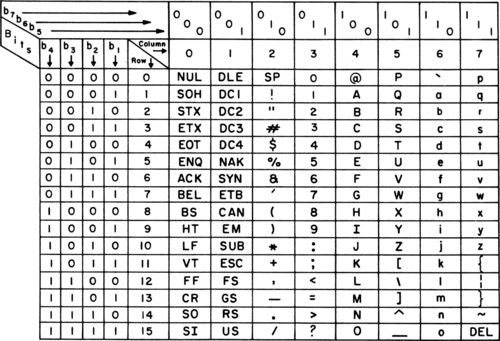
In order for this to be applied to our messages, they must be represented as a sequence of zeros and ones. An ASCII table is used for this, which translates letters into sequences of zeros and ones.
What does the ASCII table look like?
What does this look like in an example?
The word "Hello" looks like this as binary code: 1001000 1100101 1101100 1101100 1101111
Now a random sequence is created that is the same length as the message: 1101010 0101001 1010101 1011101 0110111
Translated into letters using ASCII, this results in: j)U]7
The second message part is now created with XOR and results in: 0100010 1001100 0111001 0110001 1011000
Translated into letters with ASCII, this results in: "L91X Both parts do not make sense on their own.
In which format is the message transmitted?
Most communication channels on the Internet use Base64 coding. In this format, messages are broken down into blocks of 6 ones or zeros to make them easier to transmit. As a result, 3 letters of the ASCII character set are divided into 4 message parts. Since each of these message parts can also be represented as a letter, the message sent looks different from the original message parts. However, if everything is represented as a sequence of ones and zeros, both versions (ASCII and base64) are identical.
What is the Message Id in the secret share parts?
The Message Id that you see in the each of the secret share parts are used to identify which message they belong to. Imagine you have exchanged a lot of secret messages with some of your contacts. The message Id can then be used to find the two parts of a certain message easily.
How are the numbers in the Message Id selected?
The Message Id numbers are generated randomly each time you click the "Create secret messages" button.